Building a JIRA MCP Server: AI-Powered Project Management
Tired of clicking through JIRA to create tickets, update statuses, and plan sprints? What if your AI assistant could handle all those repetitive tasks? That's exactly what the JIRA MCP Server enables - AI-powered project management!
What You'll Learn
- 🎯 The Problem - Why JIRA tasks are repetitive
- 💡 What MCP Does - Let AI manage JIRA for you
- 🏗️ How It Works - Simple automation flow diagram
- ⚙️ Quick Setup - Get started in minutes
- 🛠️ Cool Automations - What AI can do with JIRA
- 📊 Real Results - Time saved and efficiency gained
- 🚀 Get Started - Download and try it yourself
The Problem
JIRA is powerful but time-consuming:
- Creating tickets - Writing descriptions, setting fields
- Sprint planning - Moving tickets, estimating work
- Status updates - Changing statuses manually
- Reporting - Generating metrics and reports
- Linking work - Connecting tickets to code
Wouldn't it be nice if AI could do this stuff?
The Solution: JIRA MCP Server
The JIRA MCP Server lets your AI assistant talk directly to JIRA. Think of it as hiring an AI project manager!
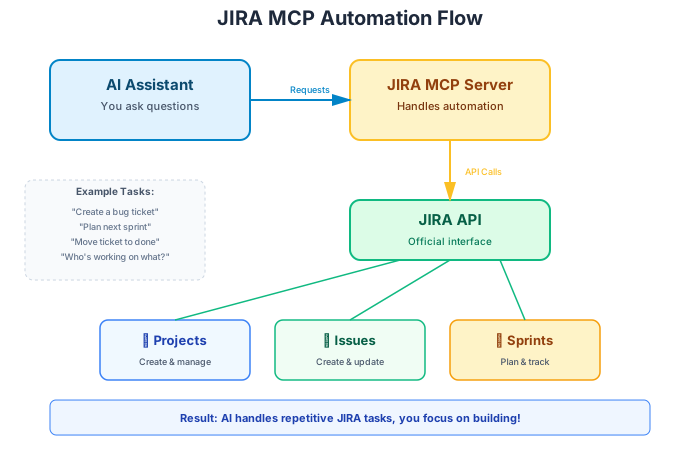
How it works:
- You tell your AI what you need
- AI asks the MCP server
- Server calls JIRA's API
- JIRA does the work
- AI confirms it's done
Simple!
What Can Your AI Do?
Ticket Magic
- Create tickets - "Create a bug: Login button not working"
- Search tickets - "Show me all high-priority bugs"
- Update tickets - "Move JIRA-123 to 'In Progress'"
- Add comments - "Comment on JIRA-456: Fixed in PR #789"
Sprint Superpowers
- Create sprints - "Create Sprint 23 starting next Monday"
- Plan sprints - "Add top 5 stories to the sprint"
- Track progress - "How's Sprint 23 going?"
- Complete sprints - "Close the current sprint"
Project Management
- View projects - "List all active projects"
- Create projects - "Create project 'Mobile App Redesign'"
- Check boards - "Show the Dev Team board"
- Find teammates - "Who's working on the login feature?"
Smart Searches
Ask complex questions with natural language:
- "What tickets did I complete this week?"
- "Which bugs are assigned to me?"
- "What's blocking the current sprint?"
Quick Setup
Step 1: Clone the Server
Step 2: Get Your JIRA API Token
- Go to https://id.atlassian.com/manage-profile/security/api-tokens
- Click "Create API token"
- Give it a name like "MCP Server"
- Copy the token
Step 3: Configure Your AI
Add this to your AI assistant's config:
That's it! Your AI is now a JIRA expert.
See It In Action
Creating a Bug Ticket:
Sprint Planning:
Daily Standup:
Real-World Benefits
Teams using JIRA MCP Server report:
Time Savings:
- 60% faster ticket creation
- 2+ hours saved per sprint on planning
- Instant standup reports
Better Workflow:
- No more tab switching
- AI suggests next tasks
- Automatic linking between code and tickets
Cool Use Cases
Auto-Create Tickets from Code Reviews
When AI finds issues in code, it automatically creates JIRA tickets with all the details!
Sprint Planning Assistant
AI analyzes your backlog, suggests stories based on team capacity, and creates the sprint for you.
Daily Reports
Get instant standup reports without manually checking each ticket.
Link Code to Tickets
AI automatically links your PRs to JIRA tickets based on branch names.
Common Questions
"Is my JIRA data secure?" Yes! Uses official JIRA API tokens with controlled permissions. Revoke anytime.
"Works with JIRA Cloud?" Yes! Also works with JIRA Server/Data Center.
"Can I customize automation rules?" Absolutely! It's open source - modify however you like.
Technical Notes
Built with:
- Python + FastMCP for reliability
- JIRA REST API for full feature access
- Async operations for fast responses
- JQL support for smart searches
📚 Want more details? Check the GitHub repository for complete docs, advanced features, and custom integrations.
Get Started
Download: 📦 github.com/odesh009/jira-mcp
In the repo:
- Installation guide
- Configuration examples
- API documentation
- Usage examples
- Integration guides
Complete Workflow: Combine with Bitbucket MCP and see the AI-Powered Code Review blog for the full automation pipeline!
The Bottom Line: The JIRA MCP Server lets AI handle your project management busywork, freeing you to focus on building great products. Give it a try! 🚀
Thoughts & Discussion
No comments yet. Be the first to share your thoughts!