AI-Powered Code Review: Automating Pull Request Reviews with MCP
Imagine having a super-smart AI friend who checks your code for mistakes while you type - catching bugs, security issues, and suggesting improvements instantly. That's exactly what MCP (Model Context Protocol) does when combined with AI coding assistants like GitHub Copilot!
What You'll Learn
- 🎯 The Problem - Why manual code reviews slow you down
- 💡 The Solution - How MCP connects AI to your tools
- 🏗️ Architecture - How everything fits together
- ⚙️ Setup Guide - Get it running in 3 simple steps
- 🛠️ Two Ways to Use It - Interactive vs. automated reviews
- ✅ Real Examples - See it catch actual bugs
- 📊 Results - Time saved and quality improved
- 💬 Common Questions - Quick answers to "but what if..."
- 🚀 Get Started - Links to download and try it yourself
The Problem
Code reviews take a lot of time - developers spend 4-6 hours every week reviewing each other's code. Plus, you have to wait hours (sometimes days!) for feedback. What if AI could do the boring parts automatically?
The Solution: AI That Understands Your Code AND Requirements
With MCP, you can connect your AI coding assistant to both Bitbucket and JIRA. Here's the magic:
Bitbucket → AI gets your code changes
JIRA → AI gets the story requirements
Now your AI can answer questions like:
- "Does this code actually do what the JIRA ticket asks for?"
- "Did I forget anything from the acceptance criteria?"
- "Is this change related to the right story?"
Your AI can:
- Check your code as you type - catch mistakes before you even save
- Understand what you're building - reads the JIRA story to know what the code should do
- Review pull requests smartly - verifies code matches requirements
- Create task tickets - automatically log issues that need fixing
- Follow your team's rules - enforce the coding standards you define
Think of MCP as a translator that lets your AI assistant "talk to" Bitbucket and JIRA, combining code changes with requirements for smarter reviews.
How It Works
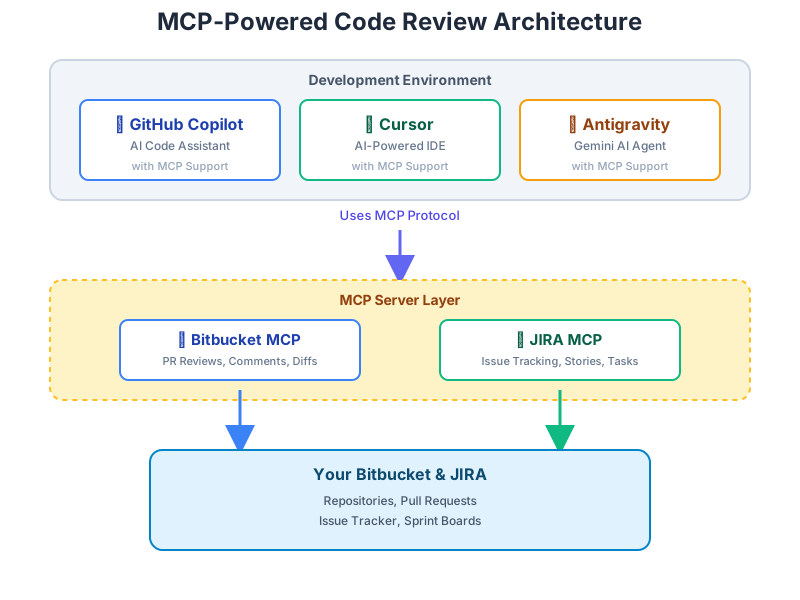
The diagram shows how everything connects:
- You write code in your editor (with AI helpers like GitHub Copilot, Cursor, or Antigravity)
- MCP servers act as bridges to Bitbucket and JIRA
- Your AI can now read PRs, check tickets, and post comments automatically
Setting It Up (The Easy Way)
Step 1: Get the MCP Servers
Think of these as installing apps that let your AI talk to Bitbucket and JIRA:
Step 2: Tell Your AI How to Use Them
Add this configuration to your AI assistant (like telling it your username and password):
💡 Pro Tip: Keep your passwords safe! Use your computer's password manager instead of typing them directly.
Step 3: Create Your Team's Rules
Tell the AI what to look for when reviewing code:
Two Ways to Use It
Way 1: Get Help While Coding (Interactive)
As you write code, ask your AI assistant:
When to use: While writing code, before committing
Way 2: Automatic PR Reviews (Batch)
When you create a pull request, the AI automatically:
- Gets your code changes from Bitbucket
- Reads the linked JIRA story for requirements
- Checks if code matches what the story asked for
- Reviews code against your team's rules
- Posts comments with suggestions
- Creates JIRA tickets for missing features or big issues
When to use: After creating a PR, for thorough team reviews
📦 Want to see the full code? Check out Bitbucket MCP and JIRA MCP
What Does the AI Check?
Security Problems
Finding dangerous code like hardcoded passwords, SQL injection risks, or exposed secrets
Code Quality
Spotting overly complex functions, duplicated code, or confusing names
Missing Things
Noticing missing documentation, error handling, or tests
See It In Action
Before (Without AI):
AI Points Out:
After (Fixed):
The Results
Teams using AI code review see:
Time Saved:
- Review time: From 6 hours/week → 2 hours/week
- Feedback delay: From 4 hours → 2 minutes!
Quality Improved:
- 85% of security issues caught automatically
- 90% better documentation
Tips for Success
1. AI Helps Humans, Doesn't Replace Them
- Let AI check the boring stuff (syntax, style, obvious bugs)
- Humans focus on the creative stuff (architecture, design, user experience)
2. Start Strict, Then Relax Begin with strict rules, then loosen them based on your team's feedback. It's easier to reduce false alarms than miss real bugs!
3. Keep Improving Every month, review what the AI flags and tune your rules. The AI learns what matters to your team.
Common Questions
"Won't the AI flag too many things?" Yes, at first! That's why you tune it. Use confidence scores to only show high-priority issues.
"What if it misunderstands my code?" Link your PRs to JIRA tickets with context. The more info you give, the smarter the AI gets.
"Will this slow down my builds?" Nope! Reviews happen in parallel. You can even queue them to avoid rate limits.
Get Started Today
What You Need:
Quick Start:
- Clone both repos
- Install dependencies: text
- Configure your AI assistant
- Define your team's coding rules
- Start coding with your AI reviewer!
Both tools are open source - customize them however you like!
The Bottom Line: AI code review saves time, catches bugs early, and helps you learn better coding practices. Give it a try and watch your code quality improve! 🚀
Thoughts & Discussion
No comments yet. Be the first to share your thoughts!