Building a Bitbucket MCP Server: Bridging AI Assistants with Code Repositories
Imagine having an AI assistant that can create branches, review pull requests, and search your code - all by just asking! That's what the Bitbucket MCP Server does. It's like giving your AI a direct phone line to your Bitbucket repositories.
What You'll Learn
- 🎯 The Problem - Why AI needs to talk to Bitbucket
- 💡 What MCP Does - The translator between AI and Bitbucket
- 🏗️ How It Works - Simple diagram of the flow
- ⚙️ Quick Setup - Get it running in minutes
- 🛠️ What You Can Do - Cool things AI can automate
- 📊 Real Impact - Time saved and productivity gained
- 🚀 Get Started - Download and try it yourself
The Problem
Enterprise teams often use Bitbucket instead of GitHub, but AI assistants don't have built-in Bitbucket support. You're stuck switching between your code editor and Bitbucket's web interface for simple tasks like:
- Creating branches
- Reviewing pull requests
- Searching code across repositories
- Managing issues
What if your AI assistant could do all this for you?
The Solution: MCP Server
MCP (Model Context Protocol) is like a universal translator. It lets AI assistants "speak Bitbucket's language" without you having to leave your editor.
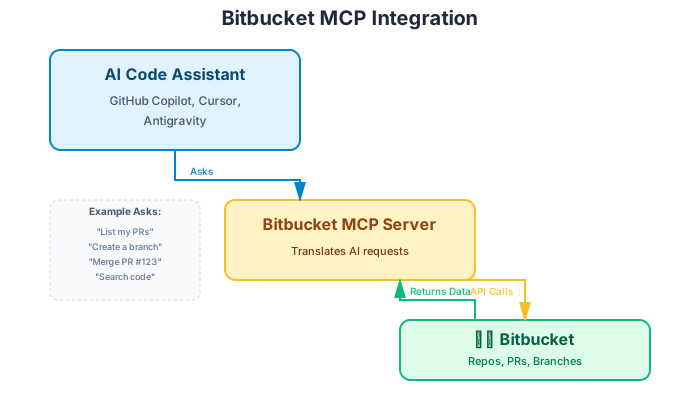
How it works:
- You ask your AI: "List my open PRs"
- AI sends request to Bitbucket MCP Server
- Server translates it to Bitbucket API calls
- Bitbucket sends back the data
- AI shows you the results
Think of the MCP server as a helpful translator sitting between your AI and Bitbucket!
What Can It Do?
Repository Magic
- List repos - "Show me all our Python projects"
- Create repos - "Make a new repo called "text
- Search code - "Find where we use the function"text
Pull Request Superpowers
- List PRs - "What PRs are waiting for review?"
- Create PRs - "Create a PR from my feature branch"
- Review PRs - "Add a comment to PR #123"
- Merge PRs - "Merge PR #123 using squash"
Branch Operations
- Create branches - "Create a branch"text
- List branches - "Show all branches with 'fix' in the name"
- Delete branches - "Delete the old branch"text
And More!
- View commit history
- Manage issues
- Track team activity
Quick Setup
Step 1: Clone the Server
Step 2: Get Your Credentials
Visit Bitbucket Settings → App Passwords → Create
- Give it a name like "MCP Server"
- Check the permissions you need
- Copy the app password
Step 3: Configure Your AI Assistant
Add this to your AI assistant's config:
That's it! Your AI can now control Bitbucket.
See It In Action
Creating a Branch:
Reviewing PRs:
Code Search:
Real-World Benefits
Teams using the Bitbucket MCP Server report:
Time Savings:
- 50% faster PR reviews
- 10+ hours saved per week on repetitive tasks
Better Workflow:
- No more switching between editor and browser
- AI catches issues during code review
- Automated team analytics
Common Questions
"Is it secure?" Yes! Uses Bitbucket's official App Passwords with scoped permissions. Revoke anytime.
"Will it work with my company's Bitbucket?" Yes! Works with both Bitbucket Cloud and Server.
"Can I customize it?" Absolutely! It's open source - add your own features.
Technical Notes
Built with:
- Python for reliability
- FastMCP for clean MCP protocol handling
- Async/await for fast API calls
- Comprehensive error handling for production use
📚 Want implementation details? Check the GitHub repository for full code, architecture docs, and advanced configurations.
Get Started
Download: 📦 github.com/odesh009/bitbucket-mcp
In the repo you'll find:
- Step-by-step installation guide
- Configuration examples for popular AI assistants
- API documentation
- Usage examples
- Contributing guidelines
Pair it with JIRA MCP: Combine with the JIRA MCP Server for complete development workflow automation!
The Bottom Line: The Bitbucket MCP Server lets your AI assistant manage your code repositories, saving time and keeping you in your flow. Give it a try! 🚀
Thoughts & Discussion
No comments yet. Be the first to share your thoughts!